

- —No ratings yet
- 7Installs
- 11.0Version
- 16.05.2026Updated
- 3Python
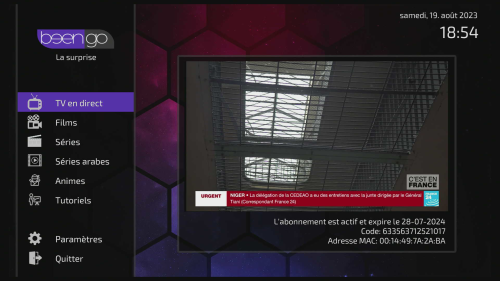
About beengo
The build Novaler publishes for its Multibox receivers on novaler.com. What's new: Nouvelle applciation ip** et vod exclusive pour tous les démo Novaler
beengo is in the Novaler category and runs on Python 3. It is free on the EnigmaPlay store for every common Enigma2 image (OpenATV, OpenPLi, OpenViX, EGAMI, OpenBH and more), and the store updates it as soon as a new version is out.
What's new
Source: موقع نوفالر (novaler.com) — الإصدار 11.0
How to install beengo
On the receiver, with the EnigmaPlay store
Open EnigmaPlay, find beengo and press the green button on the remote. The store picks the right build for your image and keeps it updated. No store yet? Install it in a minute.
From your phone, no telnet
The EnigmaPlay Android app installs it on your receiver from the sofa. Get the app
With a telnet command
Copy the command and paste it into a telnet or SSH session on the receiver:
wget -O /tmp/p.ipk "https://raw.githubusercontent.com/Ahmadarjan1/EnigmaPlay-Repo/main/files/novaler-beengo/11.0/enigma2-plugin-extensions-beengo-py3.9_11.0-r0_all.ipk" && opkg install --force-reinstall /tmp/p.ipk && rm -f /tmp/p.ipk
Ratings and comments
Rate beengo
- Loading comments…
More from Novaler
 AJPANELNovaler248 installs
 ArabicSaviorNovaler108 installs
 Key-AdderNovaler95 installs
 SubssupportNovaler87 installs
 Novaler StoreNovaler48 installs
 JediMakerXtreamNovaler44 installs
 Pluto TVNovaler32 installs
 NetspeedtestNovaler28 installs
 Weather-MsnNovaler21 installs
 IP SATNovaler13 installs
 Athan TimesNovaler12 installs
 XC pluginNovaler11 installs
More Novaler
-
AJPANELNovaler248 installs
-
ArabicSaviorNovaler108 installs
-
Key-AdderNovaler95 installs
-
SubssupportNovaler87 installs
-
Novaler StoreNovaler48 installs
-
JediMakerXtreamNovaler44 installs
-
Pluto TVNovaler32 installs
-
NetspeedtestNovaler28 installs
-
Weather-MsnNovaler21 installs
-
IP SATNovaler13 installs
-
Athan TimesNovaler12 installs
-
XC pluginNovaler11 installs